An HR manager asks an AI assistant for a new-starter document checklist and gets a good one in seconds. Then it follows the path most checklists follow. Someone pastes it into an email, six people reply with attachments over a fortnight, and a spreadsheet records who has sent what.
The list was fine. Everything after it was improvised, which is where the missing documents, the forwarded passports and the files nobody deletes come from. The CVOR connector exists to change what happens at that handoff.
What is the CVOR MCP connector?
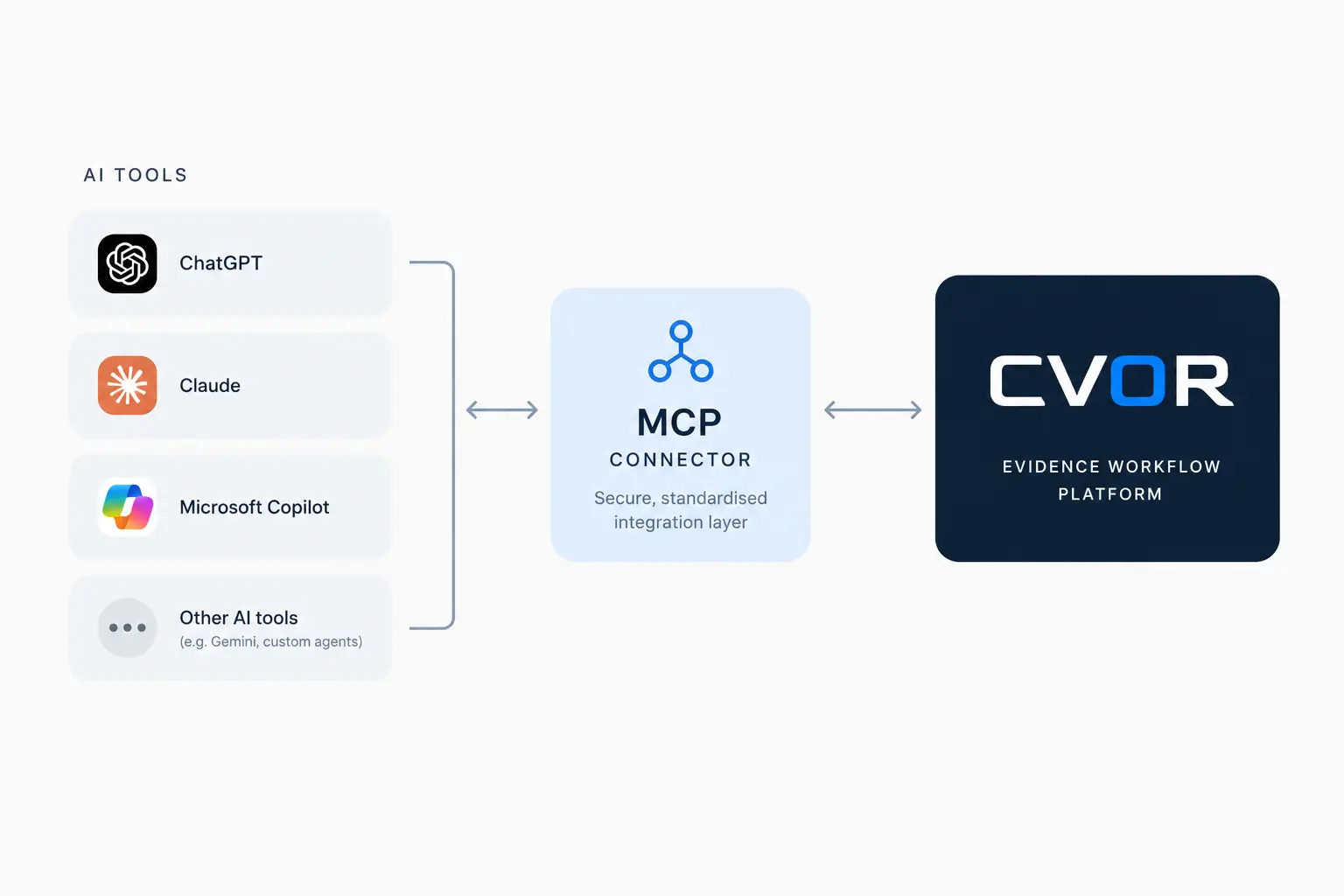
The CVOR MCP connector is a separate, optional service that lets an approved AI assistant prepare and create document requests in CVOR through the Model Context Protocol (MCP), an open standard for connecting assistants to other software. It works on Document Requests, where an organisation asks a named person for specific documents and receives them encrypted.
The connector can do four things: search the request catalogue, list programmes, preview a batch of document requests, and create only the batch that was previewed. It exposes no documents and no upload links. The rest of this article follows what happens after the batch exists, because that is the part that turns a list into a workflow.
How does an AI-drafted checklist become a governed request?
The assistant matches each checklist item to a document type in the organisation’s request catalogue and picks the programme the requests belong to, such as an onboarding cohort, which carries its own retention period. It then returns a preview of the batch for a person to read. Nothing exists in CVOR until the batch is created, and only the previewed batch is created.
Creation is all-or-nothing. Each recipient gets their own request package of up to 50 items, and one send can reach up to five recipients. An organisation owner or administrator approves the connection in the first place, and every call rechecks the connection, the membership behind it and the organisation’s access to the product.
The preview is the control that matters. A checklist drafted in chat has no owner, and a previewed batch has a named person who read it before anything was sent. The reasoning behind that is set out in the connector overview.
How are the documents collected?
Each recipient receives an email invitation with a single-use upload link that expires after 7 days. They can upload without creating an account, or sign in and fulfil the request from their personal vault. Every document is encrypted in the recipient’s browser to the organisation’s key before it is uploaded, so CVOR stores files it cannot read.
Before submission, the browser runs checks on the file: whether it opens, whether the text is readable, whether it looks like the type requested, and recency for documents such as bills, statements and payslips. Only an impossible file is blocked. Anything else raises a warning and the person can submit anyway.
Each request carries a status that moves from pending to partially fulfilled to fulfilled, so the team sees what is outstanding without reading a thread. That status is the difference between a checklist and a tracker, and it is what an email reply cannot provide.
Who chases the missing items?
The connector does not chase. CVOR does, and it does so on a schedule. A reminder can be sent manually, and optional automatic reminders run every 24 hours. Each reminder lists only the items still outstanding and issues a fresh link, so a recipient is never sent a link that has already expired.
The enterprise dashboard shows requests about to expire and items needing attention. Following up becomes a matter of reading a list, which is the premise of how to stop chasing clients for documents and of automating follow-ups without annoying people.
How are the documents reviewed?
A reviewer opens a document in their browser with the organisation vault, and the file is decrypted there. The submitter’s own check result counts only as a claim. The reviewer’s run is the trusted one, and CVOR flags any contradiction between the two.
Organisations can add optional AI review. After upload, the extracted text is pseudonymised in the browser on a best-effort basis and checked again by the server before it can reach a model. The advice is shown only to the reviewer and changes nothing automatically. Pseudonymisation is a weaker guarantee than anonymisation and redaction can miss personal information, so enabling it is a data-transfer decision for each deployment.
Two further details matter for accountability. Downloaded copies of PDFs and images are stamped with the organisation’s name and the date. And the person who shared a document is notified when the organisation views it.
How does retention close the loop?
Retention is set on the programme when the requests are created, so every document in a batch inherits a period. CVOR’s retention engine applies organisation policies, schedules disposal and uses crypto-erase, which destroys a document’s key along with the document. Legal holds are respected, so a document under hold is kept regardless of its schedule.
The audit trail records every request, upload, view, download and decision, so the question “who opened this passport, and when?” has an answer after the matter has closed. Retention controls and audit trails each have their own article.
One limit deserves plain statement. CVOR cannot delete copies that someone has already downloaded or exported. Revocation and deletion apply to access through CVOR.
What does the whole path look like on one page?
The table follows one checklist from chat to deletion and shows who handles each stage.
| Stage | Handled by | What it produces |
|---|---|---|
| Checklist drafted | The assistant | A draft list; nothing exists in CVOR yet |
| Batch previewed | The connector and a person | A preview; nothing has been sent |
| Requests created | The connector, once | One request package per recipient |
| Collected | The recipient | Encrypted uploads and a request status |
| Chased | CVOR reminders | The outstanding items and a fresh link |
| Reviewed | Your reviewer | Views and decisions on the audit trail |
| Retained and deleted | The retention engine | Disposal under the programme’s policy |
The assistant appears in two rows out of seven. The remaining five belong to the platform, which is how the arrangement keeps AI in the preparation step and leaves custody where it was designed to sit.
What stays outside the assistant’s reach?
The assistant never sees a document or an upload link, and it has no part in collection, chasing, review or deletion. The connector also covers Document Requests only, so Data Room rooms and their participants are outside its scope.
That boundary is what lets a compliance team approve the connector. The assistant prepares, a person previews, and custody stays in CVOR from the first upload to disposal.
If your team already drafts checklists in an assistant, the connector adds the rest of the path. See how it works on the connector page, or talk to the team about your document request workflow.
CVOR governs document workflows for compliance-sensitive organizations.
Explore the platform →Frequently asked questions
Does the CVOR connector chase clients for documents?
No. The connector prepares and creates the requests. Chasing is done by CVOR itself, through a manual reminder button and optional automatic reminders every 24 hours that list only the items still outstanding and issue a fresh upload link.
Can the AI assistant see the documents people submit?
No. The connector exposes no documents and no upload links. Documents are encrypted in the submitter's browser to the organisation's key, and reviewers open them inside CVOR.
Who can switch the connector on?
An organisation owner or administrator approves the connection, and the organisation's plan has to include MCP and API automation. Each call rechecks the connection, the membership and the product access.
What happens to the documents when the retention period ends?
They are disposed of under the organisation's retention policy, with crypto-erase destroying the document's key along with the document, and legal holds are respected. CVOR cannot delete copies that were already downloaded or exported, because deletion applies to access through CVOR.